Written by Nikita Revin, developer of Tonus. Published 16 October 2026. This is a developer guide for the released version 1.4.
Read the weekly summary, understand local workout history and check the criteria in the medal collection.
Download Tonus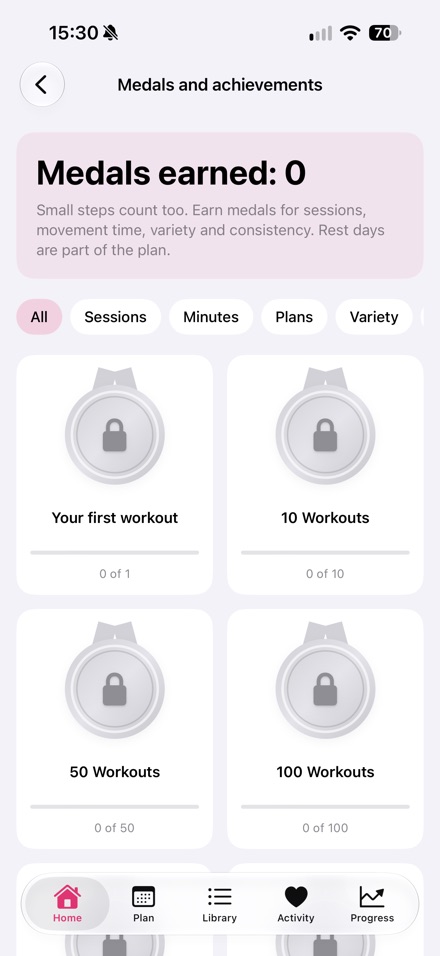
Start with the weekly summary
The home screen's weekly card brings together recorded workouts and minutes of movement. The demonstration screenshot shows 0 of 3 workouts and 0 minutes. These are examples of the app's initial state, not someone's training results. Use the summary to check what has been recorded during the week.
Separate the schedule from completed history
A plan describes the sessions ahead; workout history records the sessions completed. In the flexible trainer, a missed session moves to the next selected day while completed progress stays saved. If you return after missing a day, check the plan's current session and the existing history before making another plan.
Read the requirements for each medal
The medal collection has achievements for workouts, minutes and plans. Each item shows its own requirement and progress. In the demonstration, the first-workout and ten-workout medals are still locked. These achievements describe recorded use of the app. They do not assess health or promise a physical result.
Choose whether to share the week
The weekly summary includes an option to share a result card. Sharing is your choice. Workout history and Apple Health data stay on the device, and Health integration is optional. You can review your own progress without publishing a card or creating an account.
Check your backup before changing phones
Tonus keeps workout history locally. Local storage does not itself promise automatic synchronization between iPhones. Before erasing or replacing the device, check the backup and transfer options you use. Access is free, without a subscription or in-app purchases. This guide covers version 1.4, which requires iOS 17 or later.
Tonus does not provide medical care. Stop if you feel pain or unwell. If you have health restrictions, discuss training with a qualified professional.
Download Tonus